Platform:WinXP,WinVista,WinVista x64,Win7 x32,Win7 x64,Win2000,Windows2000,Windows2003,Windows Vista Ultimate,Windows Vista Ultimate x64,Win98,WinME,WinNT 4.x,Windows Tablet PC Edition 2005,Windows Media Cente
DBF Recovery Toolbox represents an efficient method of keeping the data safe, repairing corrupted databases of FoxPro, Clipper and some other supported formats. This tool works on any PC workstation in the local area network.
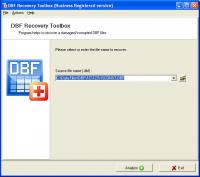
Consider the usage of DBF Recovery Toolbox to fix the damage of corrupted databases in DBF format and get the contents of affected files back regardless the reason of issue. It is not really complicated, you may easily follow the guidelines of DBF Recovery Toolbox without additional trainings, instructions and guidelines. This program runs under all supported PC configurations therefore you may apply this intelligent data recovery solution on virtually any PC, just get the installer of DBF Recovery Toolbox on your computer or any other workstation, click its installation file to continue and prepare to start the analysis of corrupted databases. DBF Recovery Toolbox can be started using its shortcut so you may go to the recovery of corrupted databases anytime you encounter database issues. Look at the interface of DBF recovery tool and evaluate its ease, the powerful data recovery engine of DBF Recovery Toolbox is easily combined with the friendly interface of selected tool. It works intuitively, just use the open file button to select a database of supported format and check the path is correct before starting the analysis. Keep in mind that there is no need to copy the database in question to your own hard disk, you may access the needed document remotely, by entering the network path to DBF Recovery Toolbox directly. After the final check of selected path you may initiate the analysis of corrupted document by clicking the Next softkey, it is all you should do, the modification of additional settings is not really needed in this case. Look at the status bar of DBF Recovery Toolbox to track the status of DBF file recovery and wait until it is successfully completed. The speed of analysis depends on the size of DBF database to be processed so you may need to wait for some time until the parsing of selected database is over. As soon as it is completed, users may look through the results, provided by this application and evaluate the recovery log.
Whats new in version 1.0.6: Recover more damaged files. Requirements: Windows 98 and above is need. Operating system: WinXP,WinVista,WinVista x64,Win7 x32,Win7 x64,Win2000,Windows2000,Windows2003,Windows Vista Ultimate,Windows Vista Ultimate x64,Win98,WinME,WinNT 4.x,Windows Tablet PC Edition 2005,Windows Media Cente Limitations: Can't save recovered data. Release notes: Major Update
MIETrak ERP Software is a fully integrated business software solution. Modules include Quoting, Order Entry, Purchasing, Scheduling, Data Collection, Routing, Work Orders, Accounting, Quickbooks Integration, Inventory Control, BOM's, Invoicing, etc.
Price: $2000, Rating: 6, Downloads: 165 Download
Online Radio Bar for FireFox - enjoy online radio & TV.
* for Windows, Linux, MacOS
* direct access to best RS search engines
* torrent search
* internet radio
* internet TV
* RSS feeds - news, soft, games
* email notif
Price: $0.00, Rating: 10, Downloads: 152 Download
This is the top of the line of the AnyOrder Professional Series. Designed for web or mail order businesses, it prepares invoices, does billings, tracks inventory, handles barcodes, processes on-line shipments, creates purchase orders & more.
Price: $489.00, Rating: 8, Downloads: 148 Download
User Rating
Rating:2.2 out of
5 Based on13 ratings.
13 user reviews.

 DBF Recovery Toolbox 1.0.6 details